
Generate a grey stock report in Texfo, by making a suitable entry for the grey stock details in the yarn stock management section of the Texfo app
The Grey Stock Report in TexFo ERP provides textile manufacturers, traders, and weaving units with a complete, real-time overview of grey fabric inventory. From loom production to warehouse stock, this report tracks every meter of fabric by lot, quality, design, shade, width, and buyer order. With accurate reporting, mills can reduce stock mismatches, plan dyeing and finishing more efficiently, and meet delivery timelines with confidence.
TexFo ensures that every roll of fabric is traceable from yarn to finished goods, giving you the power to manage stock anytime, anywhere through an intuitive dashboard.
When stock data is recorded manually in registers or spreadsheets, human errors are inevitable. Mistakes in quantity, roll length, or fabric details result in frequent mismatches between actual stock and recorded stock, leading to confusion and mismanagement.
Each grey fabric roll has a unique roll number, but without a digital system, keeping track of these numbers is tedious. Misplacement or duplication of roll numbers makes it hard to identify the right stock, which delays processing and increases the risk of sending the wrong material.
In textile businesses with multiple warehouses, manually maintained stock cannot be viewed in real time. This lack of visibility creates problems such as overstocking in one warehouse while another faces shortages, reducing overall efficiency.
When stock reports are prepared manually, it takes more time to compile data and generate reports. This delay in reporting affects planning, order fulfillment, and shipment schedules, ultimately leading to customer dissatisfaction.
Without ERP, it is difficult to calculate accurate production costs for grey stock. Hidden costs such as wastage, excess handling, and errors are not properly tracked, which affects profit margins and makes cost analysis unreliable.
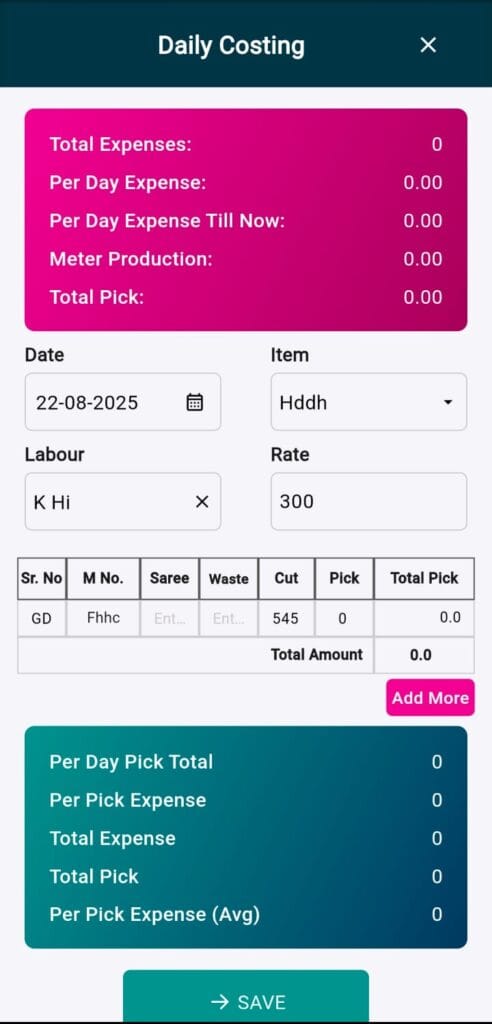
Select Date, Item, and Labour.
Add the Rate for work or production.
Input values like Machine No (M No.), Saree details, Waste, Cut length, and Pick.
The system calculates Total Pick and Total Amount automatically.
The top section calculates Total Expenses, Per Day Expense, Per Pick Expense, and Meter Production.
This helps monitor how much each meter or pick costs you in real time.
Once daily production and costing are saved, the system updates the Grey Stock Report.
This shows the total available grey stock after accounting for daily production.
Click Save, and the data is stored.
Grey Stock gets updated instantly, ensuring accuracy in inventory and cost records.
Every time you enter daily costing data, your Grey Stock Report updates automatically.
You no longer need to calculate stock manually — the system does it instantly.
Traditionally, textile businesses maintain registers and paper files for grey stock.
TexFo removes the need for manual record-keeping.
All records are stored digitally, safely, and can be accessed anytime.
Users can export the Grey Stock Report in PDF, Excel, or Google Sheet formats.
This makes it easy to share reports with management, accounts, or team members.
Instead of going through pages of registers, you get a clear, professional summary with one click.
The system generates summaries of available stock.
You can quickly check how much stock is ready to deliver, in production, or wasted.
This helps managers make faster, more informed production and sales decisions.
Manual stock entry often leads to mistakes.
TexFo automates calculations like cost per meter, cost per pick, total stock, and waste deductions, ensuring 100% accuracy.
Stay connected on the go with our Mobile app. Download now!
© Texfo. All rights reserved.